Firmer: A Modern Display Font for Impactful Design
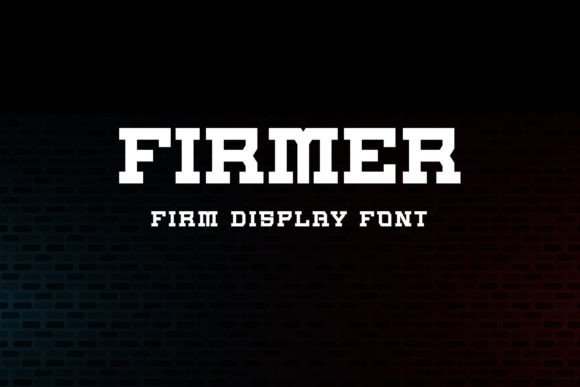
In the world of design, typography plays a crucial role in conveying messages effectively. Firmer is a modern, clean, and eye-catching display font that stands out in a crowded visual landscape. It's ideal for a wide range of applications, from posters and cards to book titles, headlines, news, banners, flyers, stationery, and more. Whether you're working on a professional project or a personal endeavor, Firmer can elevate your designs with its bold and versatile style.
As a designer, understanding how to integrate tools like Firmer into your workflow can make a significant difference in the quality and impact of your work. Firmer isn't just a font—it's a component of a broader design process that supports creativity, clarity, and consistency across various projects.
Understanding Firmer in the Design Process
Firmer is best understood as part of a larger design ecosystem. It complements other design elements such as color schemes, layout structures, and imagery. When used strategically, it can enhance the visual hierarchy of a composition, making key messages stand out while maintaining an overall sense of balance and harmony.
Before starting a project, consider the purpose of your design. Is it to inform, persuade, or entertain? Firmer's strong, geometric structure makes it particularly effective for headlines and titles where clarity and impact are essential. Its clean lines and consistent weight distribution ensure readability even at smaller sizes, which is important for both digital and print media.
During the design phase, Firmer can be used to test different typographic layouts. Its versatility allows it to adapt to various contexts, whether it's a minimalist poster or a complex magazine spread. By experimenting with different weights and spacing, you can find the perfect fit for your specific needs.
Integrating Firmer into Your Workflow
Integrating Firmer into your design workflow begins with accessibility. Adding it to your fonts library ensures that it's always available when you need it. Most design software, including Adobe Creative Suite, Figma, and Canva, supports custom fonts, making it easy to incorporate Firmer into your projects.
When working on a project, consider the following steps to maximize the effectiveness of Firmer:
- Preparation: Before selecting a font, define the tone and message of your design. Firmer works well for bold, confident statements but may not be suitable for more delicate or intricate compositions.
- Compatibility: Ensure that Firmer is compatible with the platforms and devices where your design will be viewed. Test it across different screen sizes and resolutions to maintain consistency.
- Usability: Use Firmer in moderation. While it's visually striking, overusing it can lead to clutter and reduce readability. Pair it with simpler fonts for body text to create contrast and balance.
- Organization: Keep your font library organized by categorizing fonts based on their use cases. This helps streamline your workflow and reduces the time spent searching for the right typeface.
- Efficiency: Leverage templates and pre-designed elements that include Firmer. This can save time and ensure that your designs maintain a cohesive look across multiple projects.
By following these steps, you can ensure that Firmer enhances your design rather than complicates it. The goal is to use it in a way that supports your creative vision without overwhelming the viewer.
Practical Use Cases for Firmer
Firmer is not limited to a single use case. Its adaptability makes it suitable for a variety of design scenarios. Here are some practical examples:
- Headlines and Titles: Firmer is ideal for headlines in magazines, websites, and social media posts. Its bold appearance draws attention and sets the tone for the content that follows.
- Branding and Logos: For businesses looking to establish a strong visual identity, Firmer can be used in logos and brand materials. Its clean lines and modern aesthetic help convey professionalism and innovation.
- Marketing Materials: Posters, flyers, and banners often require high-impact typography. Firmer can be used to create eye-catching headlines that grab attention and communicate key messages quickly.
- Book Covers and Publications: Authors and publishers can use Firmer to create compelling book covers and title pages. Its readability and visual appeal make it a great choice for both fiction and non-fiction works.
- Stationery and Packaging: From business cards to product packaging, Firmer adds a touch of sophistication and modernity. It's particularly effective for brands that want to stand out in a competitive market.
Each of these use cases highlights how Firmer can be adapted to meet specific design needs. The key is to understand the context in which it will be used and tailor its application accordingly.
Collaboration and Team Workflows
When working in a team, consistency is key. Firmer can help maintain a unified visual language across multiple projects and designers. By establishing guidelines for font usage, teams can ensure that all materials align with the brand's identity and messaging.
For remote teams, sharing a common font library can streamline the design process. Tools like Google Fonts and Typekit allow teams to access and use Firmer seamlessly, reducing the risk of inconsistencies caused by missing or mismatched fonts.
Additionally, when collaborating with clients or stakeholders, using Firmer can help convey a sense of professionalism and attention to detail. It demonstrates that you've chosen a font that reflects the quality and intent of your work.
Long-Term Use and Maintenance
As with any design tool, the long-term use of Firmer requires careful maintenance. Regularly updating your font library ensures that you have access to the latest versions and any necessary licensing updates. This is especially important if you're using Firmer in commercial projects, where compliance with font licenses is critical.
Over time, design trends evolve, and so do user preferences. Staying informed about typography trends can help you determine when to update or replace fonts in your library. However, Firmer's modern and timeless design makes it a reliable choice that can remain relevant for years.
Finally, consider the emotional impact of your design. Firmer's bold and confident style can evoke feelings of strength and authority, which can be powerful in certain contexts. Understanding how different fonts influence perception can help you make more informed decisions about when and how to use them.
By integrating Firmer into your design process thoughtfully, you can create more impactful and cohesive visuals that resonate with your audience. Whether you're a seasoned designer or just starting out, Firmer offers a versatile and effective solution for a wide range of design needs.